Pro AV integrators
Move from AV installation survey notes to client-ready pro AV schematics. Built for AVIXA-certified integrators and PSNI member companies who own the drawing from design through installation.
HTIFA is used by AVIXA-certified AV integrators, CTS-credentialed consultants and PSNI member companies who need a purpose-built pro AV schematic tool — not a repurposed CAD or diagramming app.
Move from AV installation survey notes to client-ready pro AV schematics. Built for AVIXA-certified integrators and PSNI member companies who own the drawing from design through installation.
Document pro AV topology, signal assumptions and alternates clearly before the equipment package is final. Purpose-built for CTS-credentialed consultants who need more than a generic diagramming tool.
Standardize meeting rooms, collaboration spaces, classrooms and boardrooms with reusable libraries and repeatable pro AV schematic exports.
HTIFA is built around the schematic conventions AV integrators and consultants already know from AVIXA training — signal domains, device topology and drawing-set handoff.
CTS and CTS-D holders use HTIFA to document the signal logic behind a design before it becomes an installation scope or a client deliverable.
PSNI integrators and their design teams use HTIFA to standardize how meeting room, collaboration space and AV installation schematics are drawn, validated and exported across projects.
Every AV installation starts with a schematic. HTIFA gives pro AV teams a dedicated tool to draw signal paths, validate device connections and hand off a complete PDF drawing set — instead of forcing AV work into a generic diagramming or CAD tool.
Turn room survey notes into a structured pro AV schematic with signal-domain routing and real device port maps — before the installation begins.
Port compatibility checks catch mismatched signal types at the drawing stage, not on-site during the AV installation.
Export a watermarked PDF or Pro-quality package with title block, BOM and share link so the installation team has everything in one place.
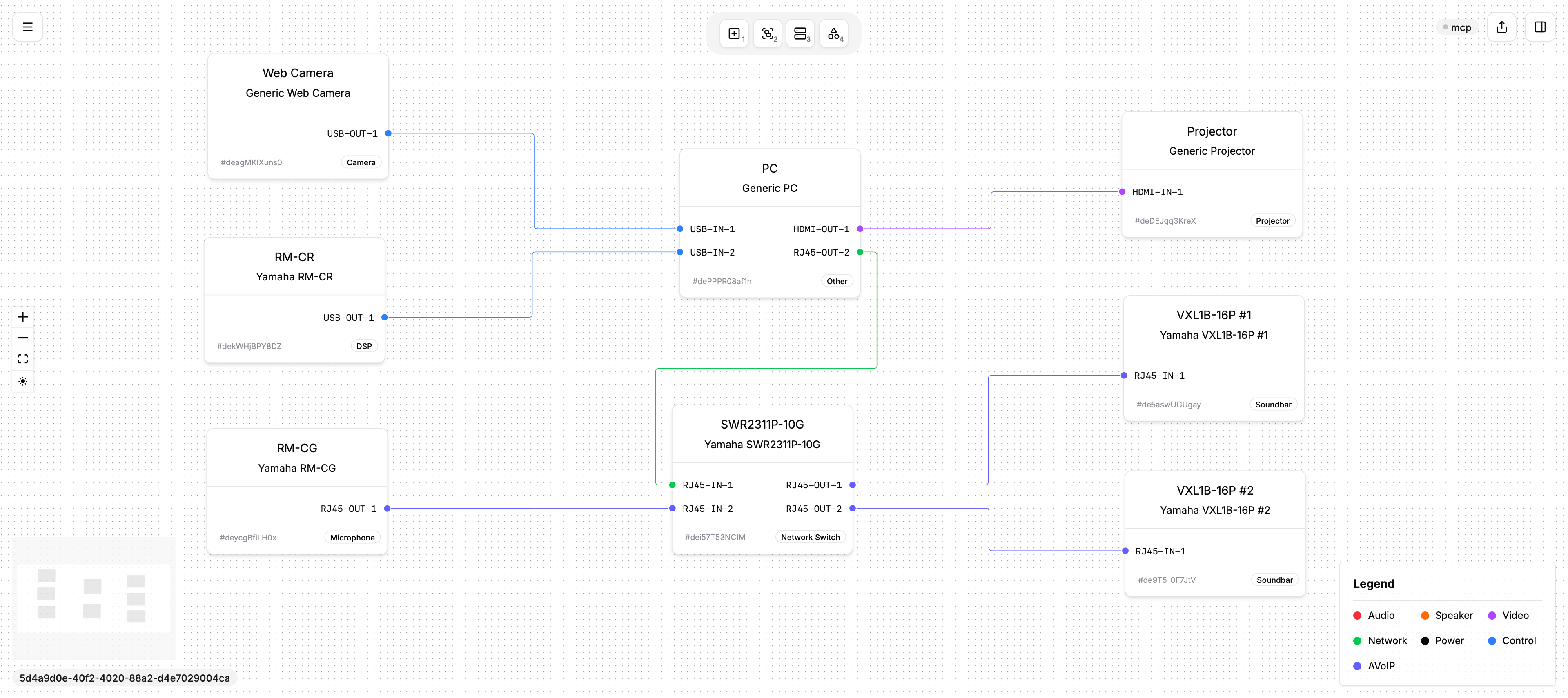
Treat a typical meeting room, collaboration space, boardroom or classroom as a repeatable system. Pro AV teams can keep the approved topology while adapting devices and endpoints per project.
Use HTIFA to document how your pro AV team draws, validates and exports AV installation schematics.